✅ What Is a Bug Report Built On?
A bug report is the only communication bridge between the developer and the QA, when it comes to clearly explaining:
❌ What broke
🔁 How to reproduce it
✅ What was expected



Amina Bell
0.0000
A Good Test Case Includes the Following Fields:
Field Description
TC ID A fixed and unique identifier, e.g., TC_Login_01
Title A short but informative name
Preconditions The required system state before execution (e.g., user must be registered)
Steps Step-by-step actions to execute the test
Test Data Input values used in the test (e.g., email = invalid@)
Expected Result The expected outcome after each step
Actual Result What actually happened during execution (important in case of failure)
Status Pass / Fail result
Notes Additional comments, e.g., “login error message appeared with delay”

Amina Bell
Shared Post
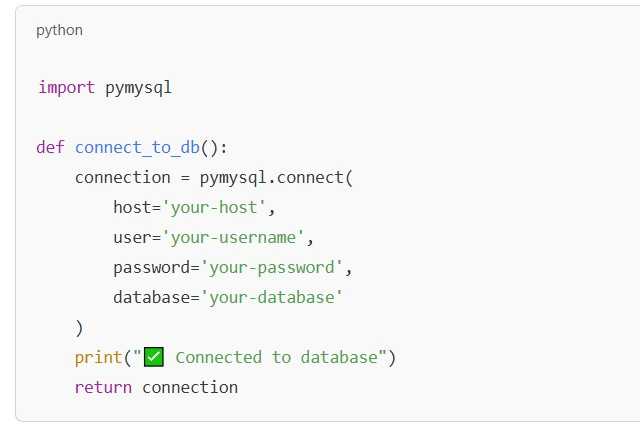
Database Connection in Python
Create a Python file (e.g. `db_connection.py`) and write a function that:
✅ **Requirements**
1. Define a function called `connect_to_db()` (or a name of your choice)
2. Use `pymysql.connect()` to establish a real database connection
3. Wrap the connection in a `try/except` block to handle errors
4. If the connection is successful, print `"✅ Connected to DB"`
5. If there's an error, print something like `"❌ Connection error: [error message]"`
6. The function should return the connection if it's successful
💡 Expected Output Example:
✅ Connected to DB
or
❌ Connection error: (1045, "Access denied for user 'root'...")

Amina Bell 🙃 🙃





Amina Bell
Shared Post


Tomas Scott 🤘 🖐
Database Connection in Python
Create a Python file (e.g. `db_connection.py`) and write a function that:
✅ **Requirements**
1. Define a function called `connect_to_db()` (or a name of your choice)
2. Use `pymysql.connect()` to establish a real database connection
3. Wrap the connection in a `try/except` block to handle errors
4. If the connection is successful, print `"✅ Connected to DB"`
5. If there's an error, print something like `"❌ Connection error: [error message]"`
6. The function should return the connection if it's successful
💡 Expected Output Example:
✅ Connected to DB
or
❌ Connection error: (1045, "Access denied for user 'root'...")
Amina Bell 🙃 🙃 🙃













Amina Bell 🤩 🤩 🤩